Showing posts with label Informative. Show all posts

Friday, November 20, 2009

Increasing the size of Windows screen Text Size

If the text on your screen is too small for easy reading, you can increase the size of the fonts. This option enables you to enlarge the fonts used in window headers, icon labels, and menus.

  • Right click on any empty area of Windows Desktop and select Properties. Desktop Display Properties
  • Click on the Appearance tab.
  • in Font size drop down box, choose Large Fonts or Extra Large Fonts. change Windows font Size
  • Click the OK button and you are done.

Note: The font size options are based on the current visual style, and color scheme. For some styles or schemes, you may only have one font size option.

Sunday, August 16, 2009

Infix PDF Editor 3.32


# Price: Free to try (Watermark on output); $99.00 to buy (Buy it now)
# Operating system: Windows Vista, Windows 95, Windows Me, Windows Server 2008, Windows XP, Windows 7, Windows NT, Windows 2000, Windows 98

Publisher's description


Use this PDF text editor like a word processor using rulers, tabs, search and replace and spell checking. Infix is the only PDF editor that intelligently re-creates the original content so that you can edit it in the way you would expect. Most PDFs just contain fragments of text - just a few words at a time. Other PDF editors allow you to edit each fragment individually. Infix is the product of more than a decade's work and development in the professional print industry. It uses a set of intelligent algorithms to recreate the original structure of the document. This means you can edit a PDF just like you would a Word document. Use Infix to edit and reflow text across columns and pages. Manipulate graphics, images, and pages. Edit PDF documents made by any software. Reuse your existing documents. Infix removes the need to convert your PDFs into other formats by enabling you to edit them directly.
Click Here To Download

Fresh HTML 3.26


# Price: Free
# Operating system: Windows Vista, Windows 95, Windows Me, Windows XP, Windows 2000, Windows NT, Windows 98

Publisher's description


FreshHTML is a software to create and edit pages for the world wide Web. FreshHTML's WYSIWYG (what you see is what you get) interface makes editing HTML pages as easy as using your favorite word processor. Its built-in editor allows advanced users to fine-tune HTML codes to fit their needs.
Click Here To Download

Web Hosting


The World Wide Web is a massive collection of web sites, all hosted on computers (called web servers) all over the world. The web server (computer) where your web site's html files, graphics, etc. reside is known as the web host. Web hosting clients simply upload their web sites to a shared (or dedicated) webserver, which the ISP maintains to ensure a constant, fast connection to the Internet.


Buying the right web hosting solution is a very important decision. Whether your website is for an online business, an information resource, a discussion forum, or for sharing views on a hobby or interest; you must use a web hosting service that will allow everyone else to view your creation. It is web hosting that empowers you to share information, sell prodcuts and services, and interact with people through a web site. Trying to choose a web host can be a very confusing exercise, especially when you consider the growing number of web hosts and their confusing advertisements. Therefore, it is important that before jumping in, you go through some sort of a research process for selecting the most appropriate web hosting company for your Internet presence.

In the heyday of the Internet giving things away for free was so fashionable that a lot of companies burned through millions of dollars giving things away, before most of them eventually went bankrupt. If you wish to run an e-commerce site or would like to generate an income from your web site, it is recommended that you seek a good paid host. There will always be the desire to keep expenses down or to cut corners, but one must take the complete picture into account. On the Internet the first impression a visitor (potential customer) gets is everything. They can easily go to another web site to seek information or to make a purchase, so you have to keep your visitors on your site. You want them to see a professional business or information web site that they can trust, not one that is too cheap to pay for a professional service.

Your particular needs are crucial in determining the kind of hosting you need as web hosting comes in many different flavors and at equally numerous price points. There are many web hosts who try to justify charging higher than average prices by offering a vast assortment of extra features. Many people don't need all these bells and whistles and never end up taking advantage of them. But by offering tons of extras that almost no one will use, some web hosts can jack up their rates. So its important that you know what services you require, shop for them by scrutinizing and reviewing the web hosts you come across.

It is important to keep in mind that like any other Internet business, web hosting has grown leaps and bounds over the last decade. In this time thousands of big and small companies have started offering various Internet services. But with the downturn of the early 2000s many of these companies have struggled and some have even gone under. Even with all of the consolidation in the web hosting industry, there are still tens of thousands of hosting companies providing various levels of hosting services.

As technology evolves these web hosts are changing as well, providing various services in addition to plain vanilla web hosting. If you run an e-commerce site, a more comprehensive content web site or a large web forum community, there are many tools that could help in your ventures. Web hosting reviews, opinions and checklists can be helpful in finding the right webhosting service provider for your needs

Monday, June 22, 2009

Repair ur system urself...


u can repair ur windows XP OS without loosing any setting or data, if u have any missing OS file or any errors, repairing will fix it.

Reboot the computer with first boot device as CD-Rom

Place the Win XP cd in CD-Rom

At the prompt "Press any key to boot from CD" press any key

Setup starts-Here u also see a Repair option but dont use it-Press Enter to continue setup-Press F8 to accept License Agreement

Now setup will search for previously installed Operating systems, a list will be displayed
Note: if u have windows 98 it wont be displayed in the list

Select the Operating system which ur repairing, like "C:\Microsoft Windows XP Professional"

Press 'R' to repair

Setup startup copying files and Restarts

Note: if the file copying process is not done and the system restarts u have to again follow the same as above by booting from CD-Rom, after file copying is done system restarts

Now u have to boot from HDD not from CD, At the prompt "Press any key to boot from CD" dont press any key, setup will continue

U need ur CD key

Warning: If u have downloaded Service Pack 2 and installed it then u have to again download and install it after repair
If u have ur Service Pack 2 inbuit in the XP CD then no need to worry, it will get installed along with Os

Use remote desktop to connect to your PC from anywhere

Windows XP Professional includes Microsoft's remote desktop software, which can be used to access your computer from anywhere you have Internet access. Not only can you access your system, you can actually see and manipulate the desktop environment just as if you were seated in front of the system.


Let's look at how to do this: In order to use Remote Desktop to connect to your home computer remotely, it must first be enabled. Right click on 'my computer' then select the 'remote' tab, and check the box entitled 'allow computers to connect remotely to this computer.'

Note: please ensure that all of your user accounts are using proper passwords before you enable this option, otherwise anyone with internet access and a Windows system can theoretically access and control your computer.

Using the 'select remote users' button, you can select user accounts that have access to the computer remotely. All members of the administrators group (that is, the built in 'administrator' account and any users who were added during the install process) are allowed remote access automatically.

Now you can install Remote Desktop Web Connection if you wish. This allows client computers to access the remote desktop through Internet explorer, eliminating the need to download and install the (freely available from Microsoft) 'Remote desktop client' program.

Insert the Windows XP Professional CD and select 'install additional windows components. Highlight 'internet information services (IIS)' and click 'details.' Highlight 'world wide web services' and click 'details.' Now put a check beside 'Remote desktop web connection,' hit 'ok' twice and then 'next' to install.

Now to connect to the remote desktop from any client computer with Internet Explorer 4 or better installed, simply type 'http://(IP address of your home computer)/tsweb' to bring up the web connect dialog screen.

Recharge your phone without electricity, Innovative idea

Recharge your phone without electricity, Innovative idea


I saw this in an e-magazine.....

1- Open your mobile cover
2- Take out your battery
3- Take two to three fresh leaves of peepal/pipal/ashwattha tree
4- Touch the stub of these leaves on your mobile battery terminal for a
minute
5- Clean the mobile battery terminal with the soft cloth
6- Put your battery again in your mobile and switch it on
7- Now you can see the result
8- If required repeat the process with fresh leaves.

Wednesday, May 6, 2009

AnnualCreditReport:Free Website to check Credit Report

Free Credit Report is widely used search term at Internet .

Beware of scam Websites. When you search internet for free credit report, most websites you find are scam or they are not free.

Here is the only website which is a legal/Official/Gov website for free credit report.

This website jointly operated by the three major U.S. credit reporting agencies Experian,Equifax and Transunion.

This central site allows you to request a free credit file disclosure, commonly called a credit report, once every 12 months from each of the nationwide consumer credit reporting companies: Equifax, Experian and TransUnion.

It is the official site to help consumers to obtain their free credit report.

Fight identity theft by monitoring and reviewing your credit report. You may request your free credit report online, request your report by phone or request your report through the mail. Free credit reports requested online are viewable immediately upon authentication of identity. Free credit reports requested by phone or mail will be processed within 15 days of receiving your request.

The address of the website is https://www.annualcreditreport.com/.

Cellphone Signal Extender

A lot of technology goes into making your cellphone work. So you would think that we would be more understanding of dropped calls and garbled conversations. Nope. Nothing gets geeks into a seething tech frenzy like poor cellphone reception... and it doesn't help that we couldn't resist the glossy black smoothness of the iPhone and AT&T sucks for cellphone service. Sad.

Cellphone Signal Booster

Well quit staring at your one-bar-worth of signal strength and pick up this handy Cellphone Signal Extender for your home or office. Simply mount the included antenna near a window and run the coax cable to the base booster unit. You get 2500 square feet of prime signal area (enough to cover 2-3 rooms on two different floors). We went from 1 bar... to 5 at the ThinkGeek secret headquarters and made our iPhones very happy in the process.

Important Note: You will need to have some signal (at least one bar), for the Cellphone Signal Extender to work. You can't extend what's not there... right?

Product Features

  • Improve your cellphone signal dramatically
  • Easy installation in minutes with multiple mounting options
  • Kit comes with everything needed for installation including cabling and hardware
  • Works with almost any cellphone provider (be sure to choose the right model for your carrier)

Product Specs 800 Mhz Model

  • Frequency: 824 - 894 MHz (Cellular)
  • Networks: CDMA, GSM, and TDMA AMPS, GPRS, EDGE, 1xRTT, EVDO
  • Total Signal Gain: 57dB (adaptive)
  • Output Power: <0.5>

Product Specs 1990 Mhz Model

  • Frequency: 1850-1990 MHz (PCS only)
  • Networks: CDMA, GSM, and TDMA
  • Total Signal Gain: 60dB (adaptive)
  • Output Power: <0.5>

General Specs

  • Unit weight: 1 lb.
  • Unit size: 5" x 7" x 2"
  • Power input: 100-120 VAC 60 Hz
  • Power output: 5VDC, 1.5A
  • Signal antenna cable: Outdoor rated 75 ohm DBS satellite coaxial cable, Type-F male
  • Base unit antenna: 50 ohm, TNC male
  • FCC Approved
  • Industry Canada Approved
  • UL Approved

What is swine flu,Its signs and Preventin

What is H1N1 (swine flu)? H1N1 (referred to as “swine flu” early on) is a new influenza virus causing illness in people. This new virus was first detected in people in the United States in April 2009. Other countries, including Mexico and Canada, have reported people sick with this new virus. This virus is spreading from person-to-person, probably in much the same way that regular seasonal influenza viruses spread.

Why is this new H1N1 virus sometimes called “swine flu”? This virus was originally referred to H1N1 Influenza virus imageas “swine flu” because laboratory testing showed that many of the genes in this new virus were very similar to influenza viruses that normally occur in pigs in North America. But further study has shown that this new virus is very different from what normally circulates in North American pigs. It has two genes from flu viruses that normally circulate in pigs in Europe and Asia and avian genes and human genes. Scientists call this a “quadruple reassortant” virus.

What are the signs and symptoms of this virus in people? The symptoms of this new H1N1 flu virus in people are similar to the symptoms of seasonal flu and include fever, cough, sore throat, runny or stuffy nose, body aches, headache, chills and fatigue. A significant number of people who have been infected with this virus also have reported diarrhea and vomiting. Also, like seasonal flu, severe illnesses and death has occurred as a result of illness associated with this virus.

Prevention:

What can I do to protect myself from getting sick? There is no vaccine available right now to protect against this new H1N1 virus. There are everyday actions that can help prevent the spread of germs that cause respiratory illnesses like influenza.

Take these everyday steps to protect your health:

  • Cover your nose and mouth with a tissue when you cough or sneeze. Throw the tissue in the trash after you use it.
  • Wash your hands often with soap and water, especially after you cough or sneeze. Alcohol-based hand cleaners are also effective.
  • Avoid touching your eyes, nose or mouth. Germs spread this way.
  • Try to avoid close contact with sick people.
  • Stay home if you are sick for 7 days after your symptoms begin or until you have been symptom-free for 24 hours, whichever is longer. This is to keep from infecting others and spreading the virus further.

Sunday, April 12, 2009

Windows Azure: Next Generation Operating System

Dubbed Windows Azure, it's less a replacement for the operating system that runs on one's own PC than it is an alternative for developers, intended to let them write programs that live inside Microsoft's data centers as opposed to on the servers of a given business.

"It's a transformation of our software and a transformation of our strategy," said Ray Ozzie, a computing industry pioneer who now serves as Microsoft's chief software architect.


Wednesday, April 1, 2009

250GB Fire-Safe Waterproof HARD DRIVE


The world's first and only fire resistant and waterproof hard drive. Direct USB connectivity to a laptop or desktop computer. Enables backup of critical data in the event of crash, computer failure and fire and water-related disasters. Contains a One-Touch 4 Mini Hard Drive from Maxtor. Encased hard drive is protected from dust and dirt.

WaterProof Fire Resistance Hard Drive

Provides "peace of mind" fire and water security protection for computer-based information. USB 2.0 Interface -- Simply plug it in and connect to virtually any laptop/desktop computer. Easy to use -- "point and click" navigation enables drive management, security settings, and backup scheduling.

WaterProof Fire Resistance Hard Drive

Features:

  • Not Applicable
  • USB Y-Cable included
  • USB 2.0 bus powered
  • Back up software included
  • Security features include password protection & data encryption
  • After Fire and Water Data Recovery Support Program
  • LED power indicator light
  • Durable high gloss silver finish
  • 250GB Hard Drive holds 71,400 photo images at 3.5mb per image OR
  • Holds 62,500 songs at 4mb per song OR
  • Holds 250,000 PowerPoint documents at 1mb per file OR
  • Holds 1,250,000 Word documents at 200kb per file OR
  • Holds 2,000,000 Excel documents at 125kb per file

XnView: Free Image Viewer/Editor for Windows Mobile/Smartphones

XnView: Free Image Viewer/Editor for Windows Mobile/Smartphones

You can easily visualize your images and photos on your Smartphone with XnView.

Windows Mobile image viewer

Image Formats Supported :

Reading :

jpeg / jfif, gif, bmp, png, 2bp, tif, pcx, pbm, pgm, ppm, pnm, psd, tga, ico, .

Writing : jpeg, gif, bmp, tga, png

Features :

  • English, french, german, danish, spanish, hungarian language.
  • Display in 5 modes : Thumbnail, List, Detail, Filmstrip and full screen.
  • Use of the favourites to simplify and accelerate the navigation through files.
  • Quick thumbnails loading.
  • Display informations, exif and iptc of images.
  • Sorting of images by the name, the date, the type, the size and the
  • definition, the whole in ascending or decreasing order.
  • Conversion of images between the different supported formats.
  • Resize images according to various factors, sizes.
  • Adjust brightness, contrast or gamma
  • Screen capture.
  • Display animated GIF.
  • Display multi-page TIFF.
  • Slideshow with transition effects.
  • Send pictures by email.
  • Association of image types with XnView Pocket.

More screenshots:

Windows Mobile image editor Windows Mobile image editor Windows Mobile image editor Windows Mobile image editor Windows Mobile image editor Windows Mobile image editor

You may download it from

Thursday, March 26, 2009

Safari 4 - Speed Test - Weird Results - Incompatible With Popular Sites and Software

I saw that Apple has released Safari 4 Beta

I love the way that Apple approaches design and I keep hoping upon hope that they will someday deliver a better, faster browser instead of one that seems fast for a few things but cannot be your day to day default browser.

I think Firefox is great, fast and ugly. I know you can skin it, etc. You cannot turn an ugly troll like Firefox and Explorer into a princess like Safari 4 Beta. You also cannot teach that princess (Safari 4) to walk and chew gum at the same time.

The game changer might just be Opera 10 (now in Alpha) which I will cover in a separate review.

Here are the raw browser speed test results for Firefox 3.06, Safari 4 and Internet Explorer 8:

browsers safari 4 speed test w Safari 4   Speed Test   Weird Results   Incompatible With Popular Sites and Software

browsers firefox 306 speed test w Safari 4   Speed Test   Weird Results   Incompatible With Popular Sites and Software

browsers explorer 8 beta speed test w Safari 4   Speed Test   Weird Results   Incompatible With Popular Sites and Software

Now just wait a second, you say, that’s not right, I thought that Firefox was the fastest!

In actually fact, it’s the fastest stable/compatible browser and today, in my humble opinion the one you want to use as your day to day default browser.

If you want a car to go really really fast, just take out all the things that weight it down, like brakes for instance! While Safari has great speed results (especially considering how bad they were before under Safari 3) it could not even post this article

Wednesday, March 25, 2009

Mr I Spy Digital Camera Binoculars

This isn’t the first set of binoculars capable of taking digital photographs. It is, however, one of the cheapest models I’ve seen. Which might be a down side for serious picture takers, but for the casual photographer it’d be a great find. For anyone from birdwatchers, kids, aspiring spies and even perverts with a non-photographic memory, this would be a great camera to have around. It’s also slightly more inconspicuous, since other binoculars with a camera built-in sometimes have an extra pop up screen, making it more likely you could sneak these into a concert.

These 1.3MP binoculars run on 2 AAA batteries. It also has 16MB of memory, which will get you 40-50 images in HI mode or 100-150 in LO mode. It can take not only images, but video as well, sadly it’s video without sound though. The HI mode mentioned before gives pictures in 1280 x 1024 pixels while LO mode gives 640 x 480 pixels. You can purchase this for £29.95 or about $44 from Gadgets.co.uk. If you don’t have the cash for it now, they allow you to wishlist it on Facebook, to give a not so subtle hint to someone else that you want it.

Taser Axon system records everything cops see

Taser Axon system records everything cops see

taser-axom-system.jpgWhen someone accuses cops of doing something wrong, it's usually their word against the cops. But not so if the cop happened to be wearing the Taser Axon on-officer recording system.

Essentially, the Axon is a head-mounted camera that captures everything that the officer sees. This is great because it'll collect perfect evidence of everything they see, making court cases much more cut and dry as to what exactly happened. The trick will just be getting cops to wear them, which might not be too easy. But in any case, it'd make Cops a lot more interesting.

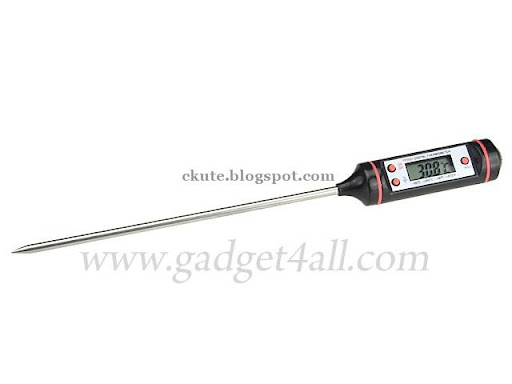
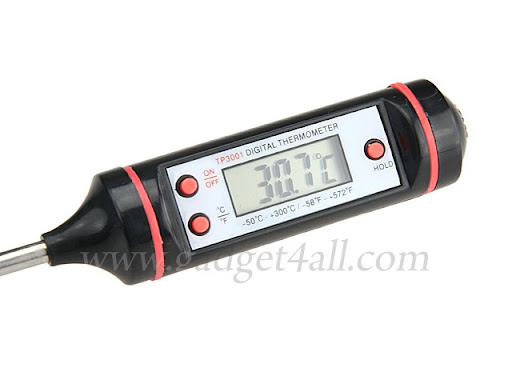
Food Thermometer

Food Thermometer is slim designed for measuring food temperature and normal contact temperature testing. It is easy to operate. Just touch the object and press the ON button. It is great for barbecue, roasting or baking delicious food.

Food Thermometer

Features and Specifications:

  • Temperature range: -50 to +300 degree Celsius (-58 to +572 degree Fahrenheit)
  • Resolution: 0.1 Celsius / Fahrenheit
  • Accuracy:
  • +/- 1 degree Celsius or +/- 2 degree Fahrenheit (from 0 to 80 degree Celsius)
  • +/- 5 to 10 degree Celsius or +/- 10 to 20 degree Fahrenheit (other temperature range)
  • Power supply: 1.5V
  • Low battery description
  • Data hold
  • Celsius / Fahrenheit select button
  • On / Off button
  • Size: 225*22*22mm
  • Weight: 20g

Additional Images: Click the picture to enlarge

Food Thermometer 2 Food Thermometer 3

Food Thermometer is available for US$16.00 from

iPhone 2G/3G Power Station With Solar Panel


External emergency backup power battery for your iPhone 2G/3G

Charge the power station by your USB cable or the built-in solar panel. Plug the power station to your iPhone to charge your iPhone at any time and any where.

SEMCG001900_04_L

Features:

  • Capacity: 800mAh
  • Battery Type: Lithium-ion battery
  • Demension: 6.1*5.3*1.25 cm
  • Weight: 48g
  • Capacity: 800 mAh
  • Rated Input: 5V 500mAh
  • Rated Output: 5V 500mAh
  • Charging time: about 3 hours
* Please Charge the Power Station before Usage.
* Please Charge the Power Station and iPhone Separately. (Do Not Charge the Power Station and iPhone At the Same Time)

Additional Images: Click the picture to enlarge

SEMCG001900_01_L SEMCG001900_02_L SEMCG001900_03_L

Package Content:
One iPhone 2G/3G Power Station With Solar Charger

iPhone 2G/3G Power Station With Solar Panel - 800mAh is available for US$22.00 from

Tuesday, March 24, 2009

Canon LV-Series LCD Multimedia Projectors

Canon LV-Series LCD Multimedia Projectors meant for use in classrooms and boardrooms. This includes its first with a native 1280x800 widescreen, the 3,000-lumens LV-8300, along with the 3,000-lumens LV-7370 and 3,500-lumens LC-7375 multimedia projectors, which sport 1024x768 resolutions. The LV-8300's resolution will display the entire screen of widescreen notebooks and computers without any distortion. The three are closely related, as other than the resolution and brightness differences between them, they are nearly identical.

Canon LVSeries LCD Multimedia Projectors

As such, nearly all features are shared, including a 1.2x zoom lens, a whiteboard mode that optimizes images for the glossy dry-erase board, and a screen color correction mode that allows users to account for display surfaces of different colors. Connections include a DVI-I port with HDCP support for both protected and unprotected HD signals as high as 1080i and 720p. Connecting to networks is done via an Ethernet port.

Canon LVSeries LCD Multimedia Projectors

Five modes in the flexible image settings include Standard, Presentaion, Cinema, Video and sRGB settings for quick changes to the displayed images look. Aspect ratios can also be changed from this menu. An Auto-Keystone Correction feature will correct for any tilt in the projector, squarely throwing up the image on a screen. Closed captioning can be turned for the hearing impaired or when the built-in 7W speaker is not loud enough.

A carrying handle is built into each LV unit, which have individual weights of about 7.3lbs. For more efficient energy use, Canon has integrated a timer that turns off the projector after a pre-set amount of time, which users can change. Another auto detection feature switches the power on whenever a computer or notebook are connected.

All three projectors will ship mid-March, with the LV-8300 priced at $1,399, the LV-7375 at $1,799 and the LV-7370 at $1,299.

Monday, March 23, 2009

BEST Possible USB, YET ~!~

What if you suddenly lost one finger during an accident? I hope it won’t happen. But, if it did, you may want to think positively. Jerry lost his finger during a biking accident, he discussed with doctor and reached an interesting idea. It’s turning the finger to be a 2GB USB drive.

Look closer to his lost finger, it’s now a plastic finger with USB memory. Everytime he wants to copy something, he plugs his hand into the computer. Oh, then he can only type using one hand.


BEST Possible USB YET

BEST Possible USB YET

BEST Possible USB YET

BEST Possible USB YET

BEST Possible USB YET

BEST Possible USB YET


BEST Possible USB YET

BEST Possible USB YET

BEST Possible USB YET

BEST Possible USB YET

BEST Possible USB YET

BEST Possible USB YET